

DBT fertilizer sale to farmer through POS machine APK uses a QR Token to identify the farmer, authenticate via Aadhaar biometric or OTP, then records the subsidised fertilizer transaction digitally. The complete 8-step process — from app update to bill printing — takes under 5 minutes per transaction. Urea is sold at Rs.242 per 45-kg bag and DAP at Rs.1,350 per 50-kg bag after DBT subsidy is applied.
- System Name: DBT in Fertilizers — Direct Benefit Transfer, launched October 2016
- App Version (Latest): DBT Fertilizer App 3.31 (updated July 2025)
- Supported Platforms: Android POS devices, Android mobiles, Windows PC/laptop
- Farmer ID Method: QR Token scan or manual Application ID entry
- Retailer Login: Aadhaar biometric via Mantra RDService (L1 fingerprint scanner required)
- Farmer Authentication: Aadhaar biometric OR OTP-based
- Urea MRP (45 kg bag): Rs.242 (government-fixed; exclusive of neem coating charges)
- DAP MRP (50 kg bag): Rs.1,350 (stable under NBS scheme)
- Subsidy Model: 100% subsidy paid to manufacturer after PoS-authenticated sale
- Governing Body: Department of Fertilizers, Ministry of Chemicals & Fertilizers
- Official Portal: fert.nic.in
- SMS Receipt: Sent to farmer’s mobile after every DBT sale (since PoS v3.1, Sept 2020)
- No-Denial Policy: All Aadhaar-authenticated farmers must be sold fertilizer — no refusal allowed
- Total PoS Devices Deployed: 2 lakh+ retail outlets covered pan-India
- What is DBT Fertilizer Sale to Farmer via POS Machine?
- Who Should Use This DBT POS Machine Guide?
- DBT Fertilizer Subsidy Value — How Much Does Each Bag Save?
- Eligibility & Requirements for Retailers and Farmers
- DBT Fertilizer Sale via QR Token — 8-Step Process (Complete Guide)
- DBT QR Token vs Manual Entry vs OTP Authentication — Comparison
- Pros and Cons of DBT Fertilizer Sale Through POS Machine
- Important DBT & Fertilizer Scheme Terms Every Retailer Must Know
- Important Dates & Compliance Deadlines for DBT Retailers
- Important Links — DBT Fertilizer Retailer Resources
- Conclusion
- Key Takeaways
- Frequently Asked Questions — DBT Fertilizer Sale to Farmer 2026
What is DBT Fertilizer Sale to Farmer via POS Machine?
DBT fertilizer sale to farmer is the government-mandated digital transaction system through which every authorized fertilizer retailer in India must record the sale of subsidised agricultural inputs — using a Point of Sale (POS) machine APK and a QR Token to identify and authenticate each farmer buyer. Introduced in October 2016 by the Department of Fertilizers under the Ministry of Chemicals & Fertilizers, the DBT in Fertilizers system ensures that 100% of the fertilizer subsidy reaches the intended farmer — not divertors or middlemen — by recording every transaction digitally with Aadhaar authentication.

The QR Token is a pre-generated digital token issued to the farmer after they pre-book their fertilizer requirement through the Framework for Fertilizer Sale (FFS) system. The retailer scans this QR code using the POS machine camera, retrieves the farmer’s application details instantly, authenticates the farmer’s identity via Aadhaar biometric or OTP, selects the fertilizer product and quantity, processes payment, and prints the bill — all within a single session on the DBT Fertilizer App. The entire transaction is recorded in the central system, triggering the government’s subsidy payment to the manufacturer for that sale.
The latest version of the app — DBT Fertilizer App 3.31 (released July 2025) — supports L1 fingerprint scanners (UIDAI-compliant Mantra MFS110 and similar devices), resolves the earlier “Please Wait…” authentication bug, and enables Bluetooth invoice printing. As of mid-2026, over 2 lakh retail outlets across India are DBT-enabled, covering all states on a pan-India basis since March 2018.

Who Should Use This DBT POS Machine Guide?
- 🏪 Licensed Fertilizer Retailers & Dealers: Any retailer authorized to sell subsidised fertilizer under the DBT system who needs a clear, step-by-step reference for every transaction on the POS machine APK — including new staff being trained at the outlet.
- 🌾 Agriculture Input Store Owners: Shop owners handling multiple product lines (seeds, fertilizers, pesticides) who need to understand the full DBT POS workflow before each kharif or rabi sale season begins.
- 📱 Retailers Upgrading to DBT App 3.77: Sellers migrating from older app versions (3.1, 3.2) who need to understand the updated L1 biometric scanner workflow, Bluetooth invoice printing, and the new QR Token integration under the Framework for Fertilizer Sale (FFS) system.
- 🚜 Cooperative Society Fertilizer Distribution Officers: PACS, IFFCO, and Kribhco cooperative outlet managers responsible for DBT fertilizer sales to member farmers who want a complete documented guide for auditing and training purposes.
- 👨💼 Agriculture Department Field Supervisors: Block-level and district-level officials who supervise and audit retailer DBT compliance and need a complete reference for verifying retailer sales records and stock reports.
- 🧑🏫 KVK & ATMA Trainers: Krishi Vigyan Kendra and Agricultural Technology Management Agency personnel conducting DBT POS training sessions for rural fertilizer retailers and cooperative outlets.
- 📋 New Retailers Getting First POS Device: First-time DBT POS machine users who have received a new device from their fertilizer company and need the complete process from app setup to first farmer sale documented in one place.
- 🌱 Farmers Wanting to Understand the Process: Farmers who want to understand what happens at the retailer’s end when they arrive with their QR Token, so they can verify the retailer is following the correct DBT procedure and not overcharging them.
DBT Fertilizer Subsidy Value — How Much Does Each Bag Save Farmers?
The DBT fertilizer system ensures that every farmer purchasing subsidised fertilizer through an authenticated POS transaction pays only the government-fixed MRP — not the market price. The government bears the entire difference as subsidy, paid directly to the manufacturer after each authenticated sale. Here is what each fertilizer bag costs farmers vs. what it would cost without the DBT subsidy system:
| Fertilizer | Pack Size | MRP to Farmer (2026) | Estimated Unsubsidised Market Price | Government Subsidy Per Bag | Farmer Saving |
|---|---|---|---|---|---|
| Urea | 45 kg bag | Rs.242 | Rs.2,000–2,500 | ~Rs.1,760–2,260/bag | ~87–91% |
| DAP | 50 kg bag | Rs.1,350 | Rs.3,200–3,800 | ~Rs.1,850–2,450/bag | ~55–65% |
| MOP | 50 kg bag | Rs.1,670 | Rs.2,200–2,500 | ~Rs.530–830/bag | ~25–33% |
| NPK (10:26:26) | 50 kg bag | Rs.1,470 | Rs.2,400–2,800 | ~Rs.930–1,330/bag | ~35–47% |
| SSP | 50 kg bag | Rs.400–450 | Rs.700–900 | ~Rs.300–450/bag | ~40–50% |
For Kharif 2026, the Union Cabinet approved Rs.41,533.81 crore in NBS scheme subsidies for P&K fertilizers alone. Total urea subsidy in the Union Budget 2026 stands at approximately Rs.70,000–80,000 crore. Every time a retailer completes a correct DBT POS transaction with Aadhaar authentication, this subsidy is accurately accounted for and released to the manufacturer — making the retailer’s correct procedure directly critical to the government’s subsidy disbursement system.
Eligibility & Requirements for Retailers and Farmers in DBT Fertilizer System
Before conducting any DBT fertilizer sale, the following requirements must be in place for both the retailer and the farmer:
Retailer Requirements
- 🏪 Valid Fertilizer Retail License: Must hold a current fertilizer retail license issued by the state agriculture department under the Fertilizer Control Order (FCO)
- 📱 Registered DBT POS Device: POS machine or Android device registered under the DBT in Fertilizers system and assigned a Retailer ID by the fertilizer company
- 🖐️ L1 Biometric Scanner: UIDAI-compliant L1 fingerprint scanner (such as Mantra MFS110) with current RDService app installed — L0 scanners are no longer compliant as of 2025 UIDAI update
- 🔑 Valid Retailer ID & PIN: Assigned by the fertilizer company or state authority for login to the DBT Fertilizer App
- 📦 Adequate Stock: Fertilizer stock must be received and acknowledged in the system (via Acknowledgment Receipt in the app) before it can be sold to farmers
- 🌐 Active Internet/GSM Connection: POS device requires active data connection for real-time Aadhaar authentication and transaction recording
- 📲 Latest App Version: DBT Fertilizer App 3.31 or latest — older versions may have authentication failures or compliance gaps
Farmer Requirements
- 🪪 Aadhaar Card: Active Aadhaar number registered with UIDAI — biometric or OTP authentication required at POS
- 📱 Mobile Number linked to Aadhaar: For OTP-based authentication if biometric fails or farmer prefers OTP
- 📋 QR Token (preferred): Pre-generated QR Token from the Framework for Fertilizer Sale (FFS) mobile app after pre-booking fertilizer requirement — or Application ID for manual entry
- 🌾 No-Denial Policy Protection: Even without a QR Token, any Aadhaar-authenticated farmer must be sold fertilizer — retailers cannot deny sale to authenticated farmers
Application Fee Structure (for Retailers)
| Item | Cost / Detail |
|---|---|
| DBT Fertilizer App (Android/Windows) | Free — available from official DBT Fertilizer portal |
| L1 Fingerprint Scanner (Mantra MFS110 or equivalent) | Rs.1,500–Rs.3,500 (one-time purchase) |
| Retailer POS Device (if new) | Supplied by fertilizer company; may involve a security deposit |
| Retailer Dealer Margin (Urea) | Rs.354/MT included in MRP; Rs.50/MT extra for digital acknowledgment |
| Internet/SIM data plan | Rs.200–Rs.500/month (standard mobile data plan) |
DBT Fertilizer Sale via QR Token — 8-Step Complete Process
Follow every step below exactly as described. Do not skip or merge any step — each corresponds to a distinct screen and action in the DBT Fertilizer POS Machine APK. The sequence is fixed by the Department of Fertilizers and applies to all states under the pan-India DBT rollout.
Step 1 — Update and Open the DBT App on POS Machine
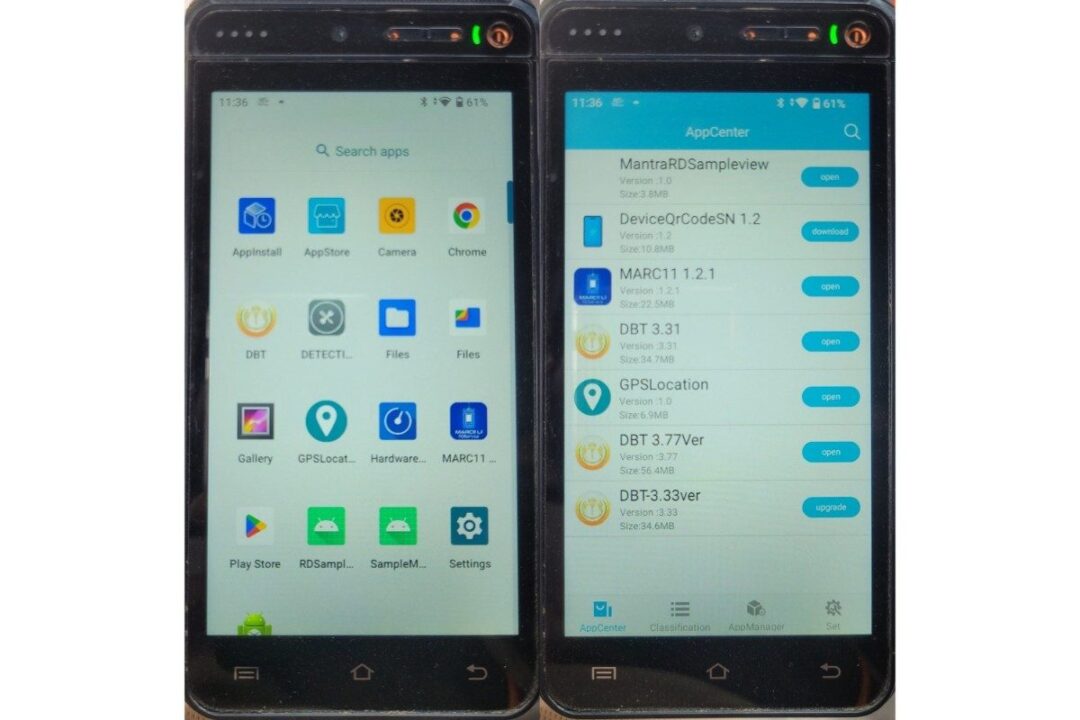
Before starting any farmer sale transaction, check and update the DBT application to the latest version. An outdated app can cause authentication failures, biometric scan errors, and missed compliance features.
- Open the App Store or AppCenter on the POS machine or Android device.
- Search for “DBT Fertilizer” or navigate to the updates section and check if a newer version is available.
- If an update is available, tap Upgrade / Download and wait for the installation to complete. The current stable version is DBT Fertilizer App 3.77.
- Open the App Drawer on the device and locate the updated DBT application icon.
- Tap the DBT icon to launch the application and proceed to the language selection screen.
Important: For VisionTek POS devices (G11 and Android models), the app update requires manual download of the APK file and transfer via pendrive or Bluetooth — automatic updates may not work. For Mantra and other Android POS devices, over-the-air updates from the AppCenter are available directly.
Step 2 — Select Language on the Welcome Screen

The DBT Fertilizer application is multilingual, supporting major Indian regional languages to make the process accessible to retailers and farmers in their native language. Selecting the correct language ensures all labels, button names, and error messages display correctly throughout the session.
- On the Welcome screen of the DBT in Fertilizers application, locate the Select Language option.
- Tap Select Language and a list of available languages will appear — typically including Hindi, English, Marathi, Telugu, Tamil, Gujarati, Punjabi, Bengali, Kannada, Odia, and others based on your state.
- Tap your preferred language from the list.
- Tap Next to confirm the selection and proceed to the login/authentication screen.
Step 3 — Complete Aadhaar Biometric Verification of the POS Owner/Operator (Retailer Login)

This step verifies the identity of the retailer or authorized operator logging into the DBT system. The biometric authentication ensures only licensed, registered retailers can access the system — preventing unauthorized access and protecting the integrity of the DBT subsidy record.
- On the DBT login screen, enter your Retailer ID in the first field.
- Enter your PIN in the second field (the PIN assigned during retailer registration).
- Tap Fetch Active Users to retrieve the registered user profiles linked to this Retailer ID.
- A Consent of Aadhaar Holder screen will appear showing the consent text for Aadhaar-based authentication. Read the consent carefully.
- Tap Accept to give consent for Aadhaar biometric authentication to proceed.
- The Mantra RDService biometric screen will appear on the POS device — indicating the fingerprint scanner is ready to capture the biometric.
- Place any finger firmly and flatly on the fingerprint scanner surface when prompted. Hold for 2–3 seconds until the scanner confirms capture.
- The system will authenticate the fingerprint against UIDAI records. On successful authentication, you will be logged in and the User Menu will appear.
If fingerprint authentication fails: Clean the finger and scanner surface, try a different finger, or check that your L1-compliant RDService app (Mantra RDService, Morpho RDService, etc.) is running in the background. L0 scanners are no longer UIDAI-compliant — replace with an L1 scanner if you are facing repeated authentication failures.
Step 4 — Understand the User Menu and Select Sales of Fertilizer

After successful retailer login, the User Menu appears — the central navigation screen of the DBT in Fertilizers application. Understanding each menu option prevents wrong-screen navigation and accidental entries. For a DBT farmer sale via QR Token, only one menu option is needed.
- 📋 Acknowledgment Receipt: Use this section to acknowledge the receipt of fertilizer stock delivered to your outlet by the plant/distributor. Fertilizer cannot be sold through the DBT system until its receipt is acknowledged here first. This is the mandatory first step for new stock arriving at your shop.
- 🌾 Sales of Fertilizer: This is the section used for all DBT farmer sales — whether via QR Token, Application ID, or direct Aadhaar authentication. Select this option whenever a farmer arrives at your counter with a QR Token to purchase fertilizer. This is the option you need for the QR Token sale process.
- 📑 Fertilizer Application Requests: Displays pending fertilizer application requests submitted by farmers through the FFS system — helping you anticipate upcoming demand and plan stock accordingly.
- 📊 Report: Four sub-reports available — Fertilizer Stock Report (current stock position), Fertilizer Received Report (stock received during any period), Fertilizer Sale Report (all sales during any period), and Duplicate Bill (reprint any past sale invoice). Use this section for daily reconciliation and audit preparation.
- ⚙️ Admin: System-level settings and administrative functions for authorized POS operators — including user management and device configuration. Not required for regular sales operations.

For the DBT sale to a farmer through QR Token, tap Sales of Fertilizer from the User Menu and proceed to Step 5.
Step 5 — Scan QR Code and Verify Farmer Application Details

This step is the core identification stage — where the QR Token links the farmer’s pre-booked application to the retail transaction. Correct scanning and verification at this stage ensures the right product and quantity are sold to the right farmer.
- Under Sales of Fertilizer, select Sale to Farmers/Cultivators from the available options.
- The Scan QR Code screen will open and activate the POS device camera automatically.
- Ask the farmer to show their QR Token (displayed on their mobile or printed). Hold the QR code steady in front of the POS camera until it scans successfully.
- If the QR code is unavailable (farmer does not have mobile or token has expired): Enter the Application ID manually in the provided text field and tap Submit.
- The application will display the Application ID Details — showing the application date, product name, unit type, and quantity approved for this farmer.
- Carefully verify all displayed details: confirm the product matches what the farmer has requested, the quantity is correct, and the application is current (not an old/expired application).
- Tap OK to confirm the application details and proceed to farmer verification.
- On the Retailer Sale screen, select whether the fertilizer purchase is for Self (the farmer themselves) or Others (an authorized representative collecting on the farmer’s behalf — such as a family member).
- Select the identification type: Aadhaar Number or Virtual ID (VID generated on the UIDAI portal as an alternative to the full Aadhaar number).
- Enter the farmer’s Aadhaar number (or Virtual ID) in the provided field carefully — double-check before proceeding.
- Choose the authentication method: Biometric Based Authentication (fingerprint or iris scan) or OTP Based Authentication (one-time password sent to the Aadhaar-linked mobile number).
- Complete the selected authentication method — place the farmer’s finger on the scanner for biometric, or enter the OTP received on their mobile for OTP-based. On successful authentication, the system confirms farmer identity and proceeds automatically.
Step 6 — Check Purchase History, Buyer Details, and Stock Availability
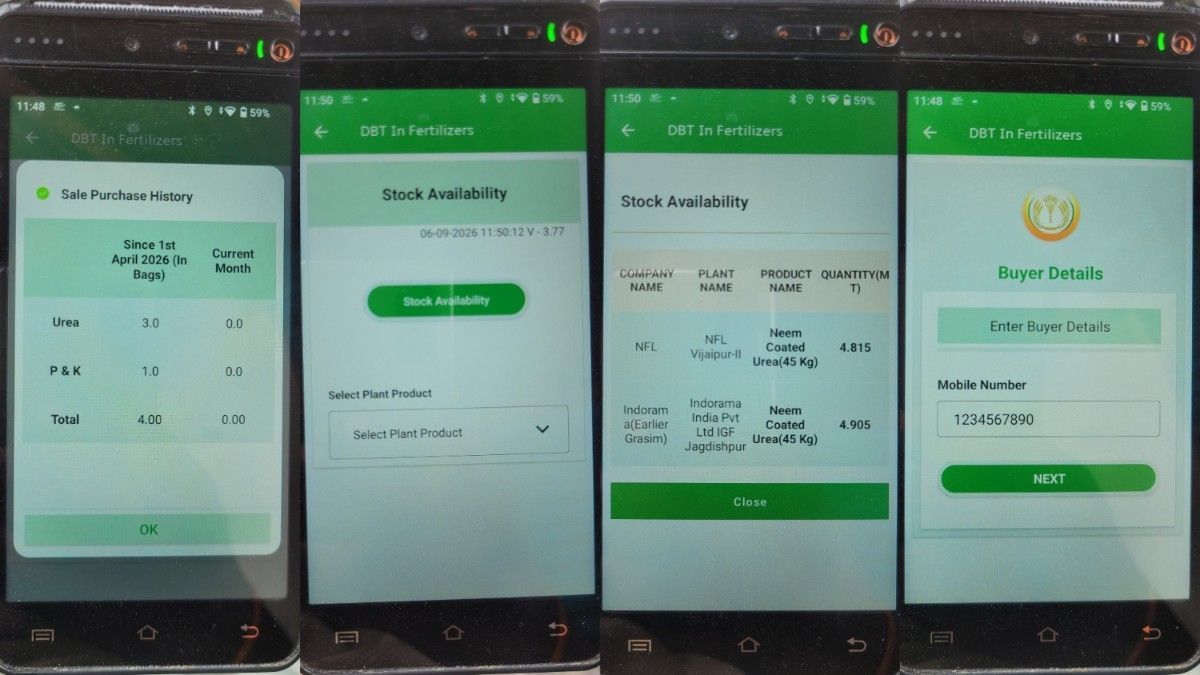
After farmer authentication, the system displays critical pre-sale information that helps the retailer verify compliance with fertilizer purchase limits and check current stock before confirming the sale. This step prevents over-selling and ensures stock accuracy.
- Review the Sale Purchase History screen showing this farmer’s previous fertilizer purchases — including quantities of Urea, P&K fertilizers (DAP, MOP, NPK), and the total quantity already purchased in the current season.
- This history helps you ensure the farmer has not already exceeded their application quantity or seasonal limit at another outlet. Note any past purchases before proceeding.
- Tap OK to acknowledge the purchase history and proceed to buyer details entry.
- On the Buyer Details screen, enter the farmer’s Mobile Number — this number will receive the SMS receipt/invoice after the transaction is completed (as per the SMS feature introduced in PoS v3.1).
- Tap Next to proceed to the stock availability check.
- The Stock Availability screen will appear. Tap Stock Availability to view your current fertilizer inventory in the system.
- From the Plant Product dropdown list, select the fertilizer product the farmer wants to purchase (e.g., Urea, DAP, NPK-specific grade).
- The system will display the Company Name, Plant Name, Product Name, and available Quantity in MT — confirming you have enough stock to fulfill this farmer’s requirement before proceeding to the sale entry.
Step 7 — Select Fertilizer Product, Unit, and Enter Sale Quantity

This is the transaction entry step — where the actual sale details are entered into the system. Every field must be entered accurately, as this data directly determines the subsidy amount calculated and recorded by the Department of Fertilizers.
- On the Stock Availability screen, tap Select Plant Product to choose the specific fertilizer product for this transaction.
- Select the required plant/product from the available list — for example: “Urea – IFFCO Nangal – 45 kg bag” or “DAP – Coromandel – 50 kg bag”.
- The system will display the Available Quantity (MT) for the selected product from your acknowledged stock.
- Select the appropriate Unit from the dropdown — either 45 Kg Bag (standard unit for urea), 50 Kg Bag (standard for DAP/NPK/MOP), or Kg if selling loose/partial quantities.
- Enter the Sale Qty — the number of bags (or kg) the farmer wants to purchase, as per their application quantity. Do not exceed the approved application quantity.
- Enter or verify the Price (Rs.) per unit — this will be pre-populated with the government-fixed MRP. Do not alter the price — selling at above-MRP is a compliance violation under the Fertilizer Control Order.
- The system automatically calculates the Amount (Rs.) = Sale Quantity × Price per unit.
- Check the Subsidy (Rs.) amount displayed by the system — this is the per-bag government subsidy that will be credited to the manufacturer after this authenticated sale.
- Review all sale details one final time: product name, company, plant, quantity, unit, price, total amount, and subsidy figures.
- Tap Add to add this fertilizer line item to the transaction cart. If the farmer is purchasing more than one product (e.g., both urea and DAP), repeat Sub-steps 1–10 for each additional product before proceeding to payment.
Always tap Stock Availability before entering sale quantity — do not rely on physical bag count alone. The system’s available quantity (MT) reflects only stock that has been formally acknowledged via Acknowledgment Receipt. Selling more than the acknowledged quantity will cause system errors and compliance flags. If your physical stock is higher than system stock, complete the Acknowledgment Receipt for the latest consignment first, then proceed with farmer sales.
Step 8 — Select Payment Method, Submit Transaction, Print Bill, and Deliver Fertilizer

This final step completes the DBT fertilizer sale — recording the transaction in the central system, generating the official sale receipt, and concluding the physical handover of fertilizer to the farmer. Follow every sub-step to ensure the transaction is fully recorded and the farmer receives their bill.
- Review the Details of the Sale Entered summary screen — showing all added line items with plant/product, company, sale quantity, unit, and amount for each product. This is your last chance to verify everything before submitting.
- If any detail is incorrect — wrong quantity, wrong product, wrong unit — tap the Delete option next to that line item to remove it, then re-add the correct entry by returning to Step 7.
- Under Select Payment Option, choose the payment method:
| Payment Method | How it Works | When to Use |
|---|---|---|
| Cash | Farmer pays the MRP amount in cash to the retailer at the counter | Most common — farmer pays exact MRP amount |
| Cashless | Digital payment via UPI, card swipe on the POS device, or bank transfer | Preferred — cleaner audit trail; encourages digital transactions |
- Select Cash or Cashless as applicable and confirm the payment receipt from the farmer.
- Review the complete final transaction summary — including all products, total amount, and payment method selected.
- Tap Submit to transmit the transaction to the central DBT server. Wait for the confirmation screen — do not close the app or leave this screen until confirmation is received.
- On successful submission, the system will display a Transaction Confirmation / Success screen with the Invoice Number. This confirmation means the transaction has been recorded centrally and the manufacturer will receive the subsidy credit.
- Tap Print Bill (or use the integrated printer on the POS device / Bluetooth printer on Android app version) to print the sale receipt/invoice. The receipt includes: Invoice Number, Retailer Name, Farmer Name, Aadhaar (masked), Product Name, Quantity, Amount Paid, Subsidy Amount, and Date-Time stamp.
- Hand the printed receipt to the farmer — this is their official proof of subsidised fertilizer purchase. The farmer’s mobile will also receive an SMS confirmation from the DBT system on their Aadhaar-linked number.
- Physically count and deliver the exact quantity of fertilizer (matching the invoice) to the farmer immediately — do not substitute brands, grades, or reduce quantity from what is printed on the bill.
The DBT fertilizer sale to farmer via QR Token is now successfully completed. The transaction is recorded in the Department of Fertilizers’ iFMS (integrated Fertilizer Management System), and the government will credit the subsidy to the manufacturer’s account based on this authenticated sale record.
DBT QR Token vs Manual Entry vs OTP Authentication — Method Comparison
| Parameter | QR Token Scan | Manual Application ID Entry | OTP-Based Authentication (No QR) |
|---|---|---|---|
| Farmer Identification | Auto-retrieved from QR code scan | Manual entry of Application ID number | Aadhaar number entered manually |
| Speed | Fastest — under 15 seconds | Moderate — 30–60 seconds for manual ID entry | Moderate — OTP delivery takes 30–90 seconds |
| Accuracy | Highest — no manual entry errors | Risk of ID transcription errors | Depends on correct Aadhaar entry |
| Requirement from Farmer | QR Token on mobile or printed | Application ID number (can be noted on paper) | Aadhaar-linked active mobile number |
| Works Without Internet? | No — QR retrieves data online | No — Application ID lookup needs data | No — OTP requires network for delivery |
| Biometric Alternative? | Biometric still required for farmer auth | Biometric still required for farmer auth | OTP replaces biometric entirely |
| Best For | FFS pre-booked farmers with mobile | FFS pre-booked farmers without mobile | Farmers with biometric issues (old age, disability) |
| Compliance Level | Highest — linked to pre-booked application | High — same as QR Token entry | High — OTP is UIDAI-compliant alternative |
For speed, accuracy, and compliance, the QR Token scan method is the clear winner — it auto-populates application details, eliminates manual entry errors, and completes farmer identification in under 15 seconds. Retailers should encourage all farmers to pre-book via the FFS system and arrive with their QR Token. For farmers unable to use the FFS app (elderly, feature phone users), the Manual Application ID entry is the next best option. Reserve OTP-based authentication for farmers with biometric failures due to worn fingerprints, physical disabilities, or repeated scanner mismatch — it ensures the no-denial policy is honored even when biometrics fail.
Pros and Cons of DBT Fertilizer Sale Through POS Machine
Advantages of DBT POS Machine Fertilizer Sale
- ✅ Eliminates Diversion & Black Marketing: Every sale is recorded with Aadhaar authentication — preventing bulk unauthorized purchase by non-farmers or sale at above-MRP black-market prices
- ✅ Instant Subsidy Credit to Manufacturer: Retailers complete the sale; the government triggers subsidy payment to the manufacturer automatically — no paper claims, no delays
- ✅ Automatic SMS Receipt to Farmer: Every authenticated sale sends an instant SMS receipt to the farmer’s mobile — giving them a digital proof of purchase without needing to chase a paper bill
- ✅ Real-Time Stock Tracking: The system tracks retailer stock in real-time — helping retailers plan restocking, avoid shortages, and generate accurate reports for district agriculture officers
- ✅ Legal Protection for Retailers: Every DBT-authenticated sale creates an auditable digital record — protecting honest retailers from false complaints about overcharging or stock diversion
- ✅ No-Denial Policy Enforcement: The system ensures no Aadhaar-authenticated farmer can be turned away — protecting farmers’ legal right to purchase subsidised fertilizer
Disadvantages and Challenges of DBT POS Fertilizer Sales
- ❌ Connectivity Dependence: All authentication — biometric, OTP, and QR scan — requires active internet. Poor network in rural areas causes transaction delays and frustrates farmers waiting in queue
- ❌ Biometric Failures in Elderly Farmers: Farmers with worn fingerprints due to age or manual labor frequently face biometric authentication failures — retailers must be trained to switch to OTP mode quickly
- ❌ Hardware Maintenance Costs: L1 fingerprint scanners require periodic replacement (typically every 2–3 years), and POS devices need software updates that may require technical support in remote areas
- ❌ App Update Dependency: Outdated app versions cause authentication failures. Retailers in areas with poor connectivity struggle to download updates, creating compliance gaps and transaction failures
Important DBT & Fertilizer Scheme Terms Every Retailer Must Know
- 🔵 DBT in Fertilizers (DBT-F): The Government of India’s Direct Benefit Transfer scheme for the fertilizer sector, operational since October 2016. All subsidised fertilizer sales must be recorded through Aadhaar-authenticated POS transactions under this system. Governed by fert.nic.in.
- 🔵 iFMS (integrated Fertilizer Management System): The central IT platform that powers all DBT fertilizer transactions — managing POS device authentication, stock acknowledgment, sale recording, and subsidy computation for the Department of Fertilizers.
- 🔵 FFS (Framework for Fertilizer Sale): A new pre-booking system jointly developed by the Ministry of Chemicals & Fertilizers and Ministry of Agriculture, allowing farmers to pre-book fertilizer requirements and receive QR Tokens. Piloted across 40 districts in 20 states as of July 2026.
- 🔵 QR Token: A digitally generated unique token assigned to a farmer after successful pre-booking of fertilizer on the FFS system. Contains embedded application data that the retailer’s POS machine reads via QR scan to retrieve farmer and product details instantly.
- 🔵 Mantra RDService: The UIDAI-certified Registered Device (RD) service software that enables L1 fingerprint scanners to perform Aadhaar biometric authentication on the DBT POS app. Must be updated and running in the background for biometric login.
- 🔵 L1 Fingerprint Scanner: UIDAI’s current compliance standard for biometric devices used in Aadhaar authentication. Required from 2025 onwards — older L0 devices are no longer compliant and will cause authentication failures. Compatible models include Mantra MFS110, Morpho MSO1300, and Startek FM220.
- 🔵 NBS Scheme (Nutrient Based Subsidy): Central government scheme providing per-kg subsidies on Nitrogen, Phosphate, Potash, and Sulphur nutrients in all P&K fertilizers (DAP, MOP, NPK, SSP). For Kharif 2026, Rs.41,533.81 crore approved — keeping DAP at Rs.1,350/bag and NPK at Rs.1,470/bag.
- 🔵 No-Denial Policy: The Department of Fertilizers’ mandatory rule that no Aadhaar-authenticated farmer can be refused a subsidised fertilizer sale by a licensed retailer. Violation of this policy can result in license cancellation and legal penalties under the Fertilizer Control Order.
- 🔵 Acknowledgment Receipt: The mandatory first step in the DBT Fertilizer app for every new consignment received at the retailer outlet — acknowledging the receipt of fertilizer bags from the distributor/plant and adding them to the system’s available stock.
- 🔵 Virtual ID (VID): A 16-digit temporary, revocable number generated on the UIDAI portal (uidai.gov.in) by the Aadhaar holder as an alternative to sharing the full 12-digit Aadhaar number — provides the same authentication capability with enhanced privacy protection.
Important Dates & Compliance Deadlines for DBT Fertilizer Retailers
| Event / Deadline | Date / Period |
|---|---|
| DBT in Fertilizers — Pan-India Rollout Completed | March 2018 (all states live) |
| SMS Receipt System Introduced (PoS v3.1) | 30 September 2020 |
| L1 Biometric Device Compliance Mandated | 2025 (L0 devices no longer accepted) |
| DBT Fertilizer App 3.31 Released | July 2025 |
| FFS Pilot — 40 Districts, 20 States Active | July 2026 |
| NBS Kharif 2026 Subsidy Period | April 1 – September 30, 2026 |
| NBS Rabi 2025-26 Subsidy Period | October 1, 2025 – March 31, 2026 |
| App Update Check — Recommended Frequency | Before every sale season (monthly minimum) |
| Fertilizer Control Order (FCO) License Renewal | As per state agriculture department schedule — check with District Agriculture Officer |
Important Links — DBT Fertilizer Retailer Resources
| Resource | Link |
|---|---|
| Official DBT in Fertilizers Portal | fert.nic.in/dbt |
| Department of Fertilizers — Official Website | fert.nic.in |
| UIDAI — Aadhaar Official Portal | uidai.gov.in |
| Ministry of Chemicals & Fertilizers | chemicals.gov.in |
| Agriculture Input Subsidy 2026 Guide | Agriculture Input Subsidy 2026 – Agrijob.in |
| PM-KISAN 2026 Farmer Scheme Guide | PM-KISAN 2026 Guide – Agrijob.in |
| PM KUSUM Yojana Solar Pump Scheme | PM Kisan Drone Yojana – Agrijob.in |
| DBT Bharat Official Portal | dbtbharat.gov.in |
Conclusion
The DBT fertilizer sale to farmer through POS Machine APK and QR Token is not just a government compliance requirement — it is the system that ensures every eligible farmer in India receives subsidised fertilizer at the correct MRP, while the government’s Rs.1.65 lakh crore annual fertilizer subsidy reaches manufacturers accurately and without leakage. By following all 8 steps correctly — from app update and language selection through biometric retailer login, QR scan, farmer authentication, stock check, quantity entry, payment, and bill printing — licensed retailers complete each transaction in under 5 minutes while maintaining full compliance with the Department of Fertilizers’ DBT mandate. Bookmark this guide, check for the latest DBT Fertilizer App version regularly, and ensure your L1 fingerprint scanner RDService is updated before every sale season.
- DBT fertilizer sale via POS Machine APK and QR Token is mandatory for all licensed fertilizer retailers — pan-India since March 2018 under fert.nic.in.
- The 8-step process covers: App Update → Language → Retailer Biometric Login → User Menu → QR Scan & Farmer Auth → Purchase History & Stock Check → Quantity Entry → Payment & Bill Print.
- Farmers save up to 91% on urea (Rs.242/bag vs Rs.2,500 market price) through the DBT system — each authenticated POS transaction triggers this subsidy.
- L1 fingerprint scanners (Mantra MFS110 or equivalent) are now mandatory — L0 devices are no longer UIDAI-compliant since 2025.
- If biometric authentication fails, switch to OTP-based authentication — the no-denial policy means no Aadhaar-authenticated farmer can be turned away.
- DBT Fertilizer App 3.31 (July 2025) resolves “Please Wait” errors, supports Bluetooth printing, and is the currently required version for compliance.
Frequently Asked Questions — DBT Fertilizer Sale to Farmer 2026
What is DBT fertilizer sale to farmer through POS machine APK?
DBT fertilizer sale to farmer through POS machine APK is the government-mandated digital transaction system under the Direct Benefit Transfer (DBT) in Fertilizers scheme, launched in October 2016. Every licensed fertilizer retailer must use an Aadhaar-authenticated Point of Sale (POS) device to record all subsidised fertilizer sales — ensuring the correct farmer receives fertilizer at the government-fixed MRP, and the manufacturer receives 100% subsidy credit based on actual authenticated sales. The QR Token method, introduced under the Framework for Fertilizer Sale (FFS), makes farmer identification faster and reduces manual entry errors.
What is a QR Token in the DBT fertilizer system and how does a farmer get one?
A QR Token in the DBT fertilizer system is a digitally generated, unique token assigned to a farmer after they pre-book their seasonal fertilizer requirement through the Framework for Fertilizer Sale (FFS) mobile application. The farmer registers on the FFS app with land and crop details, pre-books the required fertilizer quantity, and receives a QR code token on their mobile. At the retail counter, the retailer scans this QR code to instantly retrieve the farmer’s application details — eliminating manual data entry and ensuring the correct product and quantity are sold. As of July 2026, the FFS pilot covers 40 districts across 20 states.
Which DBT Fertilizer App version is current in 2026 and where to download it?
The current DBT Fertilizer App version in 2026 is DBT Fertilizer App 3.31, released in July 2025. It supports L1-compliant fingerprint scanners (resolving L0 compatibility issues), fixes the common “Please Wait…” authentication error from earlier versions, and enables Bluetooth invoice printing for Android POS devices. The app is available for download from the official DBT fertilizer retailer portal. It runs on Android mobile devices, Android POS machines, and Windows PCs/laptops. For VisionTek devices, manual APK transfer via pendrive may be required.
What is the no-denial policy in DBT fertilizer sales?
The no-denial policy in DBT fertilizer sales is the mandatory Department of Fertilizers directive that prohibits any licensed retailer from refusing the sale of subsidised fertilizer to any Aadhaar-authenticated farmer — regardless of the farmer’s category, landholding size, or whether they have a QR Token. Even if a farmer fails biometric authentication, the retailer must offer OTP-based authentication as an alternative. Violation of the no-denial policy can lead to the retailer’s fertilizer license being suspended or cancelled under the Fertilizer Control Order.
What is the price of urea and DAP to farmers under the DBT system in 2026?
Under the DBT fertilizer system in 2026, urea is available to farmers at the government-fixed MRP of Rs.242 per 45-kg bag (exclusive of neem coating and applicable taxes), while DAP is available at Rs.1,350 per 50-kg bag under the Nutrient Based Subsidy (NBS) scheme. MOP is priced at Rs.1,670/bag and NPK at Rs.1,470/bag. Without the DBT subsidy, urea’s true market cost would be Rs.2,000–2,500/bag — meaning farmers save up to 91% through the authenticated POS transaction process. Selling fertilizer above these government-fixed MRPs is a punishable offence under the Fertilizer Control Order.
What happens if the biometric scanner fails during a DBT fertilizer sale?
If the biometric fingerprint scanner fails during a DBT fertilizer sale — due to worn fingerprints, scanner malfunction, or RDService errors — the retailer must switch to OTP-based authentication immediately. On the authentication screen, select “OTP Based Authentication” instead of “Biometric Based Authentication.” The system will send a one-time password to the farmer’s Aadhaar-linked mobile number. The farmer enters this OTP on the POS device screen to complete authentication. The no-denial policy means the retailer cannot refuse the sale simply because biometric authentication failed — OTP is the mandatory fallback option.
How does the DBT fertilizer SMS receipt system work for farmers?
The DBT fertilizer SMS receipt system, introduced in PoS version 3.1 on 30 September 2020, automatically sends an SMS to the farmer’s Aadhaar-linked mobile number after every successful DBT fertilizer sale. The SMS contains the Invoice Number, Retailer Name, Fertilizer Quantity Purchased, Total Amount Paid, and the Government Subsidy Amount borne on the farmer’s behalf. This SMS serves as a digital proof of purchase and lets farmers verify that the retailer correctly recorded the sale — helping prevent underreporting of sale quantities and overcharging.
Can a farmer buy fertilizer without a QR Token at a DBT retailer?
Yes. A farmer can purchase subsidised fertilizer at a DBT-authorized retailer even without a QR Token. If the farmer does not have a QR Token, the retailer can enter the farmer’s Application ID manually on the Sale to Farmers screen, or authenticate the farmer directly using their Aadhaar number and biometric/OTP without any pre-booking. The no-denial policy guarantees that any Aadhaar-authenticated farmer must be sold subsidised fertilizer regardless of whether they pre-booked via the FFS system. The QR Token method is preferred for speed and accuracy, but it is not a mandatory prerequisite for purchase.